

Obsidian
I lived in it for years. The "folder of markdown files" idea, the it-stays-yours posture, the deep-but-optional power. All learned here.
If you want the maximalist version of this, go there. It is genuinely incredible.
obsidian.md ↗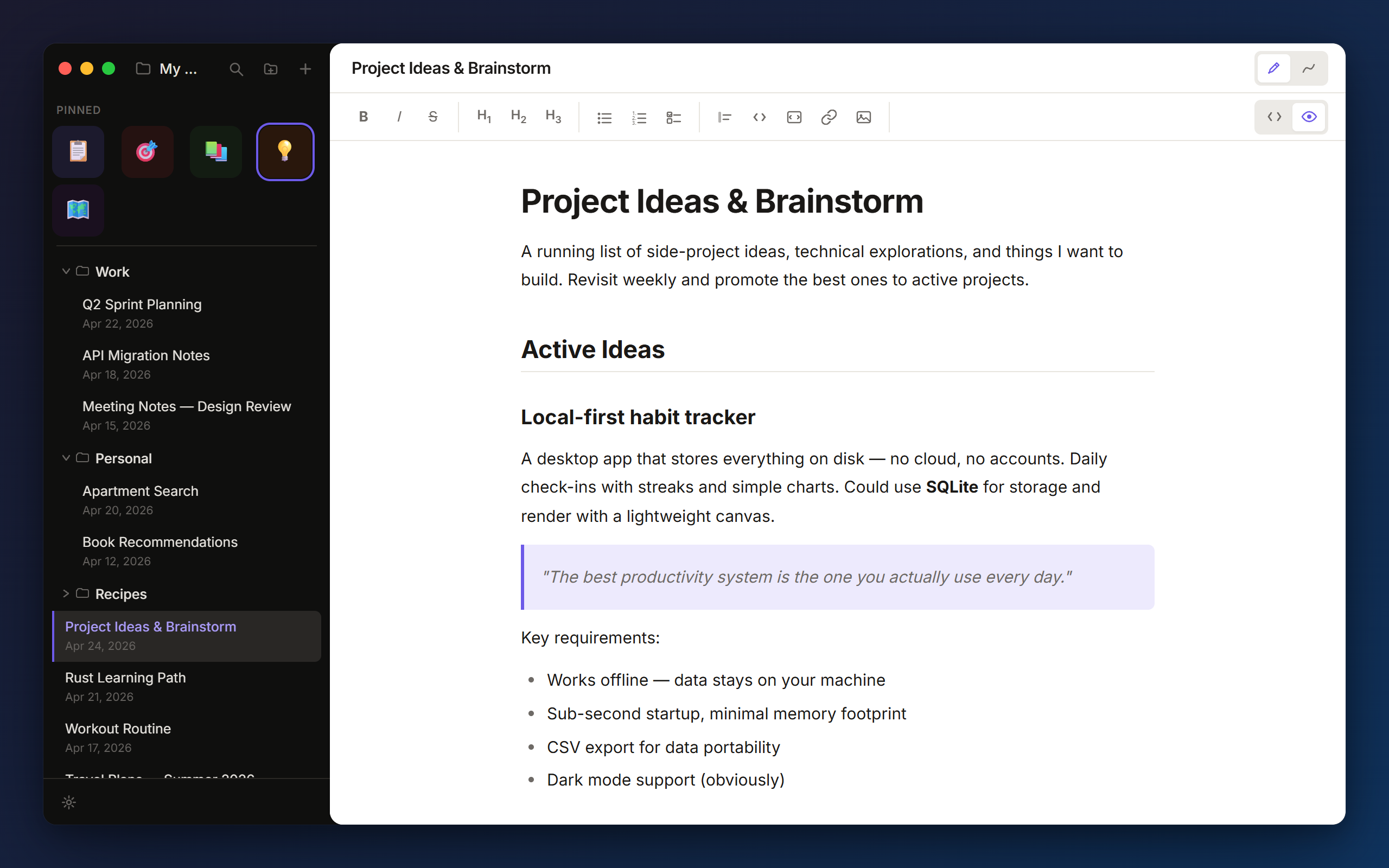
that's the whole app. no second window. no plugin store. just a folder you point it at.
Most notes apps make you choose. On one side, the powerful ones, where you spend Saturday afternoons configuring plugins instead of writing the thing you sat down to write. On the other, the simple ones, which are great until you want to draw a quick diagram and have to pop open a separate canvas app, lose your train of thought, and never quite come back.
"I draw a lot when I'm thinking through a problem. I hate switching apps mid-thought."
So I made the in-between thing for myself. A real markdown editor, with a sketch canvas attached to every note. Press a button, draw the diagram, press it again, keep writing. No second file. No second app. No lost thread.
It's been my daily driver for a while. I add things as I need them.
Notes are plain .md files in a folder you choose. Open them in any text editor. Version-control them. Back them up wherever you back things up. If you stop using Jotter tomorrow, your notes are still just files.
CodeMirror 6 under the hood. Formatting toolbar, find and replace, autosave, headings, lists, checklists, code blocks, links. Toggle between rendered preview and the raw source at any time.
One button to switch to sketch mode. Tools: V select, P freehand, R rectangle, E ellipse, A arrow, L line, T text. Stroke colour, fill style (solid, hachure, cross-hatch), stroke width, roughness.
Rough strokes, imperfect circles, hachure fills. A custom renderer with seeded randomness so shapes stay still when you interact with them. It's a deliberate aesthetic, not a limitation.
Open any folder, the notes appear immediately. Drag to reorder, drop onto a folder to move. Pin frequent notes to a quick-grid at the top with a custom emoji. Ctrl+P fuzzy-searches everything.
The app does not talk to any server I run. Not "free tier with cloud sync if you sign in." Not "use it offline." Just no accounts, full stop.
Checks on launch, then every four hours. A banner appears when there's a new version. One click downloads, one click installs and relaunches. Skip it if you want.
No splash screen. No "preparing your workspace." No loading animation. It opens like a text editor opens, because under the hood it kind of is one.
Half of what makes Jotter Jotter is what it deliberately leaves out.
|
|

|

|
|
|---|---|---|---|
| Markdown files on disk | yes | no | yes. |
| Works without an account | yes | no | yes. |
| Sketch canvas built in | via plugin | no | yes. |
| Forces their cloud on you | no | yes | no. |
| Plugin / extension store | yes | limited | no. |
| Graph view | yes | no | no. |
| Blocks & databases | no | yes | no. |
| AI baked in | plugin | yes | no. |
| Free, no upsell | mostlypaid sync | freemium | yes. |
~/notes/
├── Architecture sketch.md      ← markdown text
├── Daily/
│   ├── today.md
│   └── yesterday.md
├── Projects/
│   ├── reading list.md
│   └── recipes.md
└── .whiteboards/                 ← sketches live here
    ├── Architecture sketch.canvas.json
    └── Daily/
        └── today.canvas.json
It's all JSON. Nothing proprietary. Delete a canvas file and the note still opens fine. No database. No hidden state. Your files stay yours.
Signed installers for macOS, Windows, and Linux. All on the GitHub releases page.
Want to build it yourself? git clone, npm install, npm run tauri dev. The readme has the rest.
Yes. MIT-licensed. No paid tier. No telemetry. No upsells. Use it for work, personal stuff, anything.
Obsidian is much more powerful, and that's both its strength and its trap. Jotter is what you reach for when you don't want to spend an afternoon configuring plugins to take a note. The sketch canvas is built in, not a community add-on. There's no graph view, no plugin ecosystem, no vault format that locks you in.
Not on its own, and that's intentional. Point Jotter at a folder in iCloud Drive, Dropbox, Syncthing, a git repo, whatever you already trust. Your sync, your rules.
The canvas is keyed by the note's relative path inside the vault, so moving a file from outside the app will orphan its sketch. Move it from the Jotter sidebar instead and the sketch follows. Worst case is a stray .canvas.json file you can delete by hand.
No. The app does not talk to any server I run. The auto-updater hits GitHub for the releases feed, and that's the only network call.
There isn't one. When I run into a bug, I fix it. When I want a feature, I write it. Got a better idea than mine? lmk.
Of course. It's on GitHub. If something looks wrong, file an issue or send a PR.
Two apps did most of the thinking. Both are still better than Jotter at their own thing. Use them.
I lived in it for years. The "folder of markdown files" idea, the it-stays-yours posture, the deep-but-optional power. All learned here.
If you want the maximalist version of this, go there. It is genuinely incredible.
obsidian.md ↗
The sketch tab in Jotter is basically a love letter. Hand-drawn rendering, seeded-random shapes, the text tool that drops where you click.
I learned the canvas by drawing in theirs first. Use it. It rules.
excalidraw.com ↗